Showing posts with label android. Show all posts

Thursday, May 8, 2014

Google's Project Ara Smartphone has Tremendous Accessibility Potential


Google's futuristic modular smart phone has the potential to dramatically change how we think of electronics. The still unreleased phone call Project Ara has a interior metal structure with slots for different components to connect. For example, modular components could house a camera, battery, touch screen display, or speaker. These components snap into place making a relatively standard looking smartphone. Consumers could purchase components and assemble them to make a personalized smartphone. The phone allows consumers to exchange a component for extra battery power or a more powerful camera depending on the situation.

With such customizable hardware, the Ara phone could adapt to fit the needs of people with various disabilities. If users have a hearing impairment they could add a louder speaker component. Conversely, if a user is deaf there is no need to waste space with a speaker when the space could be used for something more useful. The possibilities are almost limitless. A blind user could possibly opt not to have a touch screen display in favor of a refreshable Braille display. Users with dexterity challenges could add a tactile keyboard.

While Project Ara sounds promising for people with disabilities, the implementation is key. Will third party hardware developers make specialized components for people with disabilities at an affordable price? Can Google successfully configure Android to work properly with any assistive add ons third parties make?  Project Ara phones won't be available for for many months, but the project offers some exciting possibilities.


Click read more below to learn more about Project Ara.


Saturday, March 8, 2014

Any Developer Can Now Integrate Fleksy's Accessible Keyboard Into Their iOS App


Fleksy is an alternative keyboard for mobile devices including smartphones, tablets, and even smart watches. Fleksy uses predictive software that will guess which word you meant to type even if you mistype every letter. As long as your close to the right letters Fleksy will be able to correctly guess which word you meant to type. This means you don't even have to look at the keyboard. If Fleksy does make a mistake you can easily swipe through alternative suggestions.

Currently, Apple does not officially support third party keyboards to replace the default keyboard on iOS, but developers can get around this limitation by building an alternative keyboard into their app. Today, Fleksy made it easy for developers to built the Fleksy keyboard into their app. The Fleksy keyboard is now available for any iOS developer who wants to include it in their app. This announcement is very exciting because if developers get on board it will give iOS users the choice of which keyboard to use.

Having Fleksy integrated in apps is also a positive for blind and visually users. Fleksy works well with VoiceOver and because Fleksy is so good at predicting which word you are trying to type being able to see the keyboard is not as important. The Fleksy keyboard is much quicker and easier to type on then the default iOS keyboard especially for VoiceOver users.

Unlike Android were you can download Fleksy and use it will all of you favorite apps, each iOS developer will have to build in support for the keyboard. Hopefully, now that Fleksy is available for all iOS developer Fleksy will become ubiquitous on iOS. If you would like to see Fleksy integrated into one of your favorite apps you could contact the developer and ask for Fleksy integration.

To try out Fleksy download the app for iOS or Android. Fleksy is currently available in select apps such as Launch Center Pro. Click read more below to view images and videos of Fleksy.


iPhone Screenshot 2

iPhone Screenshot 3


Wednesday, November 6, 2013

New in iOS 7 and Android KitKat: Customize Subtitles and Captioning


Both iOS 7 and Android KitKat include the ability to customize captions. Now both major mobile operating systems include the ability to customize movie and video subtitles system wide.. For iOS, the customization settings are under Settings > General > Accessibility > Subtitles & Captioning. From that menu you are able to change the appearance of subtitles of any video played through the default iOS video player. There are many options for customization including font, font size, font color, and background color. Android includes a similar feature that can also be accessed in the settings menu. These options are a welcome addition to mobile devices and can make subtitles much easier to see. It is great to see both Apple and Google improving accessibility on their mobile products.


Saturday, October 12, 2013

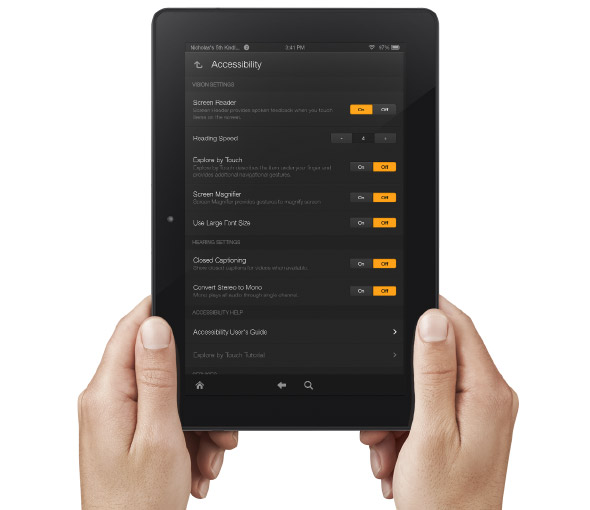
Amazon Improves Accessibility Features of Kindle Fire Tablets


Amazon's newly announced Kindle Fire HD and Kindle Fire HDX include built in accessibility features. Historically, Amazon has been slow to make their Kindle products accessible. With the new accessible Kindle Fire and accessible Kindle app for iOS Amazon maybe turning a new page. That being said, Amazon still doesn't want to make their Kindle eReaders accessible and has requested an exemption from the FCC.

The new Android based Kindle Fire tablets includes accessibility features for the blind, low vision, hearing impaired, and mobility impairments. For the blind and visually impaired the Kindle Fire includes a screen reader that can describe what is taking place on screen. There is also Explore by Touch which allows users to use gestures to navigate items one-by-one. For low vision users the new Kindle Fire tablets include a screen magnifier which is activated by a triple tap on the screen. There are also large font size and high contrast options to benefit low vision users. For users with mobility challenges the Kindle Fire can be controlled with a Bluetooth keyboard. For dyslexic users the Kindle Fire includes Immersion Reading which synchronizes the text and audio version of a book. With Immersion Reading the text is highlighted as a professional reader speaks. It is important to note that to use Immersion Reading you must own both the Audible audio version and the Kindle ebook version which can be costly. While it is very exciting to see Amazon improving their accessibility features other tablets such as the iPad include more robust accessibility features.

The Kindle Fires also include a "Mayday" button that allows you to connect with technical support at anytime. The support person can then help walk you through using different functions of your tablet. This "Mayday" button could be useful especially for new tablet users.

The Kindle Fire is available in 7 and 8.9 inch form factors both sizes are available in HD or more powerful HDX variety. The cost ranges from $139 to $229 depending on the size and features. Click here to purchase from Amazon. Click read more below to view a video about Immersion Reading.


Wednesday, July 24, 2013

Reveiw: Celluon Epic Laser Keyboard


The Celluon Epic is a Bluetooth laser keyboard. The compact device projects a QWERTY keyboard onto most flat surfaces. (Glass tabletops being the exception) You can connect the Epic to vertically any device that supports Bluetooth keyboards including devices running iOS, Android, Windows Phone, and Blackberry 10. On the back of the device there is a charging port and pairing button. Once you have the Epic paired with your device it acts the same as any other keyboard.

For any keyboard the most important consideration is the typing experience that it provides. The virtual keyboard brightness is adjustable and is easy to see in most lighting conditions. Unfortunately the brightness does not automatically adjust based on ambient light. With each keystroke a beeping sound is played which can be turned down. The typing experience on the Epic is mediocre at best. Inadvertently activating the wrong key can make typing frustrating and tiring. Even if you are a touch typist you'll still need to look down on the laser keyboard as you type. The Epic is definitely not for the blind or visually impaired.

Compared to a conventional keyboard the Epic doesn't hold its own, but if you look as the Epic as a supplement to your on screen keyboard the Epic looks more promising. If you have trouble typing on your smartphone or tablet the compact Epic may be perfect for you. You can easily bring the Epic along in your pocket and then use it when you need to type a longer email or text.

The Epic is available directly from Celluon for $169.99 and through Amazon for a special price of $149.99. Click read more to view more photos of the Celluon Epic.


Friday, June 21, 2013

Google's Advance Voice Search Comes to Chrome


Recently Google added advanced voice search to the Chrome browser. Google's advance voice search feature was previously only available for Android and iOS, but is now available on Mac and Windows. The feature is similar to Apple's Siri ,but works on your computer as well as mobile devices. To access the feature, navigate to Google using the Chrome browser and press the microphone icon to the right of the search bar. Then you can search by voice and Google will speak back select results. I have found the voice recognition to be very fast and accurate. One of the most notable features for struggling spellers is that you can ask how to spell a word and then Google will speak back the correct spelling. Google will also provide spoken responses for many other queries as well. Watch the above video to learn more.


Wednesday, March 13, 2013

Google Now Possibly Coming to iOS


Google's popular Google Now feature may be coming to Apple devices if a leaked video is to be believed. Google Now is currently an Android exclusive feature but Google has brought flagship Android features to Apple devices in the past. One example is Google's advanced voice search that came to iOS last year. Google Now has predictive cards that provide information to users automatically. The cards gather information about a users search history and provide useful information automatically. Engadget.com was sent the video which was later taken off YouTube. The leaked video is visually similar to other Google promotional videos with lends credence to its authenticity. If the video is legitimate Google Now would be a great addition to Apple's mobile devices.

Click read more to view another video about Google Now.


Thursday, December 27, 2012

Google Play Books Adds Read Aloud Feature


Google Play Books is the Google's ebookstore and companion reader apps. The Android reader app was recently updated to include a text-to-speech read aloud feature. Click here to download the free app for Android. The text-to-speech voice is a little above average but gets the job done. The read aloud feature works with most books in the Google Play store. If you have an Android device be sure to check this app out.

Click read more below to view screenshots of Google Play Books.


Friday, April 13, 2012

Smart eBook Interface Makes Navigation a Breeze


A new concept eBook reader app improves navigation of eBooks on tablets. The app makes eBook navigation more like the navigation of a printed book. This concept is best for sighted users and may not work as well for  the blind and people with physical disabilities. The concept app allows the user to flip  through multiple pages quickly, find pages more quickly and more. Currently this is only a concept but may soon be coming to the App Store. While iBooks has an easy to use interface, this new concept seems to take it a step further. Click here to learn more about Smart E-Book Interface. Click "read more below" to see more images of the app in action.


Tuesday, October 18, 2011

Wolfram Alpha is a Knowledge Engine


Wolfram Alpha is an internet based Knowledge Engine. It does more than a search engine because it can do complex math and science equation, generate bar codes, graph equations, display nutritional information and much more. You can try Wolfram Alpha free by clicking here. Wolfram Alpha gives you direct answers instead of links like Bing and Google. Wolfram Alpha can even answer trivia questions like the distance to mars or the width of a football field. The results of the search are displayed in a clear and organized manner that is easy to read.

Wolfram Alpha also has dozens mobile apps for iOS and Android. To learn more about the apps click here. The Wolfram Alpha app is a mobile portal into the Wolfram Alpha knowledge base. Other apps made by Wolfram Alpha include course assistance apps to help you pass your classes and specialized reference apps.

Siri, the iPhone 4S assistant feature also uses Wolfram Alpha to answer your question. To learn more about Siri click here.

Click read more below watch a video about Wolfram Alpha.

Sunday, August 14, 2011

Merriam-Webster Voice Activated Dictionary


Using a dictionary can be very difficult if you do not know how to spell the word you are looking for. The free Merriam-Webster app for iOS and Android solves this problem. The app allows the users to speak their search into their device just with their voice. The speech recognition is very accurate and speedy. Voice activation allows users to search for word that they can not spell. In addition to voice search, the app includes a pronunciation button which allows you to hear the correct pronunciation of a word. The app uses Nuance's speech recognition engine for voice activation. To download the free Android app click here. To download the free iPhone, iPod Touch and iPad app click here.

To learn more about other apps with Nuance speech recognition click here. To learn about accessibility features in iOS 5 click here and here.

Monday, August 1, 2011

Android Voice Search


Android phones are becoming more and more popular. Android phones do not have built-in accessibility features like the iPhone, iPad and iPod Touch. iOS devices have many built-in accessibility features but Android phones do not. One feature that Android phones do include is voice input. With voice input you can touch the microphone next to the space bar and speak your text. A similar feature is a available with Google Chrome (click here). Voice input is a helpful feature for people who struggle to spell or have physical disabilities that makes typing difficult. You can access voice input wherever there is a keyboard on Android by pressing the microphone button next to the space bar. iOS does not have system wide voice input but it is rumored to be coming in the upcoming iOS 5 this fall. If you have an iPhone, iPad or iPod Touch you can use the Dragon Go! app to get similar features.   

Thursday, June 16, 2011

OCR apps for iPhone and Android (update)


Optical Character Recognition (OCR) uses a camera or scanner to recognize printed text. Both Kurzweil and the Intel Reader use OCR in order to read documents. Using an Android phone or an iPhone you can take a picture of text and have an app recognize it. Two of these app are Page Scanner and DocScanner. DocScanner has an Android version as well. The apps sell for $5.99 and $4.99 respectively. DocScanner has a more polished user interface than Page Scanner. Both apps can create plain text files and PDFs from an image. Once the document is in plain text format, VoiceOver, which is built into the iPhone can read it back to you. DocScanner has the option to  save your document in dropbox. Their are also many other OCR apps for iPhone and Android. These apps are great if you are on the go and need to read a document quickly. These app are available on iTunes and DocScanner is available on Android Market.

Update: Zoom reader is an other OCR app for iPhone that deserves consideration.

Wednesday, June 15, 2011

Google Announces Voice Search for Desktop


Yesterday, Google announced voice search for desktop. The same feature has been available on Android for a long time. Within the next week a microphone button will appear on the right side of the search bar. To activate voice search click on the microphone and speak your query. The feature will only work with Google Chrome at launch. This feature will be great for people that have trouble spelling. If you do not know how to spell a word that you want to search you can say the word and the correctly spelled word will be inserted. Voice search will also benefit people that have trouble using a keyboard. The voice search feature is not available yet but will be shortly. Google may integrate this feature into its other web services such as Gmail.