Showing posts with label deaf. Show all posts

Tuesday, January 21, 2014

Google Smart Contacts May Help Monitor Blood Sugar in the Future


Google is rapidly developing new wearable technologies. Google's first attempt at wearable technology, Google Glass, has attracted a lot of press attention, but is still not available on the mass market. They also cost $1,500. Google's next foray into wearable technology maybe less flashy and less expensive, but may have a greater assistive technology impact.

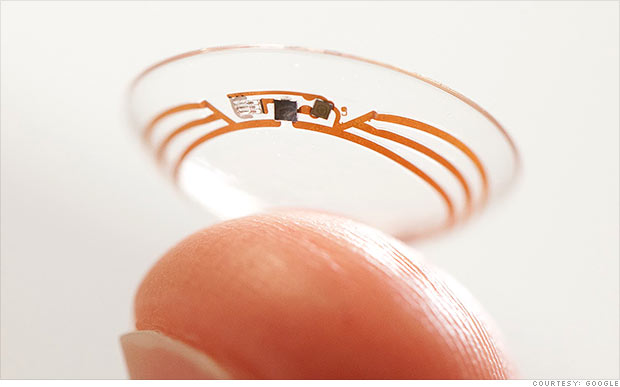
Google's smart contact will sit on the eye like conventional contacts, but do much more. Google's initial idea is to measure blood sugar in tears for diabetics with electronics integrated into the contact. Instead of drawing blood to monitor blood sugar Google's smart contact would analyze blood sugar within tears. This system would eliminate or reduce painful finger pricks and also allow for more frequent testing. A small LED light inside the contact would then illuminate different colors depending on the blood sugar reading.

While this technology is still in development the idea is very exciting. If smart contacts could benefit diabetics maybe Google can adapt them to benefit people with other disabilities or conditions. Could a contact detect sound and give a visual notification to a deaf user? Imagine this, a smart contact for the deaf senses volume of sound and direction and notifies the user. A loud sound off towards a user's right side would illuminate the right LED very brightly while a soft sound off towards a user's left would dimly illuminate the left LED. While Google has only confirmed smart contacts are in testing for blood sugar testing it is exciting to think about the possibilities five or ten years down the line. Hopefully smart contacts for blood sugar monitoring will reach the market sooner than later and will assist people with diabetes.

Click read more to view a short video about Google smart contacts.


Wednesday, November 6, 2013

New in iOS 7 and Android KitKat: Customize Subtitles and Captioning


Both iOS 7 and Android KitKat include the ability to customize captions. Now both major mobile operating systems include the ability to customize movie and video subtitles system wide.. For iOS, the customization settings are under Settings > General > Accessibility > Subtitles & Captioning. From that menu you are able to change the appearance of subtitles of any video played through the default iOS video player. There are many options for customization including font, font size, font color, and background color. Android includes a similar feature that can also be accessed in the settings menu. These options are a welcome addition to mobile devices and can make subtitles much easier to see. It is great to see both Apple and Google improving accessibility on their mobile products.


Wednesday, April 24, 2013

Amara Free Crowd Sourced Captioning For YouTubers


A service called Amara allows YouTubers to get crowd sourced help captioning their videos. Millions of people, particularly those with hearing impairments, rely on captions in order to watch movies and videos. Amara's goal is to have more captioned videos on the web. Anyone with a YouTube account can register with Amara.org for free. Then volunteers caption the videos for free. After the volunteers caption the videos the captions are then added to your YouTube video. Captioning videos can be difficult for individual video creators. Now with Amara there is no reason for YouTubers not to have their videos captioned. People can also volunteer to help caption more web videos.


Sunday, March 10, 2013

Google+ Hangouts Now Supports Sign Language Interpreters


While video chatting has helped deaf users communicate with each other, conventional video chatting runs into problem when an interpreter is involved. Google is attempting to solve this problem with its sign language interpreter app for Google+. Google+ is Google's social networking service. Google+ Hangouts now supports sign language interpreters for deaf users. With the app installed the deaf user sees the interpreter in the top right corner of the window.  When the the interpreter speaks for the deaf users, the app recognizes who is speaking and then makes the speaker the focus of the Hangout.

It is encouraging to see Google vigorously improving the accessibility features in Google+.


Sunday, December 30, 2012

Favorite Assistive Technology Apps & Products of 2012


As 2012 comes to a close I decided to make a run down of my favorite assistive technology apps and products that I have been using this year. This list is in no particular order.

Click read more view the list.


The Sky WiFi Smartpen is easy to use and seamless. It has a built in recorder and camera that, when used with specialized paper, syncs audio and written notes in the cloud. To read the Sky WiFi Smartpen review click here.


iPad mini is a great tablet because of its size, app selection, and accessibility. The lower price point makes it even more compelling. Most of all iPad mini runs all the apps that the full size iPad does and has accessibility features second to none. Click here to read more about the iPad mini.


While iOS 6 many have been short on mainstream features it has several useful accessibility features including Guided Access, highlighting with Speak Selection, Siri improvements, and VoiceOver improvements. Click here to learn more about iOS 6.


This update included great new voice search feature that I found to be better and faster than Siri. Click here to learn more about the Google Search App for iOS.


This app has a really nice interface and good scan quality which made it my favorite scanning app of 2012. Click here to learn more.


Prizmo is hands down the best OCR app for iPhone that I have used. Just take a picture of a document and it will read it to you in a matter of seconds. Click here to download or learn more about Prizmo.


A great reader of Bookshare books that allows you to read your books portably without a computer. Bookshare is an online accessible library avalible to qualified people. Click here to download or learn more about Read2Go.


Kurzweil isn't new to 2012 but it is a program I use everday. It helps me tremendously and it deserves a spot on this list. Click here to learn more about Kurzweil 3000.


Good app for listening to Learning Ally Audio books. The free app is available for all iOS devices. I would like to see the app include new features such as background audio in 2013. Click here to learn more.


Wednesday, September 12, 2012

iPhone 5 Announced


Apple announced the iPhone 5 at an event today in California. The iPhone 5 includes and bigger screen, better camera, faster processor, thinner design and more. The iPhone 5 will run on iOS 6 Apple's mobile operating system which includes accessibility features such as VoiceOver, Guided Access and Speak Selection. Click here to learn more about iOS 6.

The iPhone 5 will be available for pre-order on September 14th and for sale on September 21th starting at $199. Click read more below to view more images of the iPhone 5.


iOS 6 To Be Released on September 19th With New Accessibility Features


Today, Apple announced that iOS 6, the software that runs iPhone, iPad and iPod Touch, will be released on September 19th. The free software update will include new accessibility features such as Guided Access, Speak Selection with highlighting and improved Siri. Click here to learn more about Guided Access. iOS 6 will also include Made For iPhone Hearing Aids which allow hearing aid users to better use the iPhone. Along with accessibility improvements iOS 6 includes an updated maps app and more.

Click read more below to view more images of iOS 6 from Apple.


Tuesday, September 4, 2012

Apple To Hold Special Event on September 12

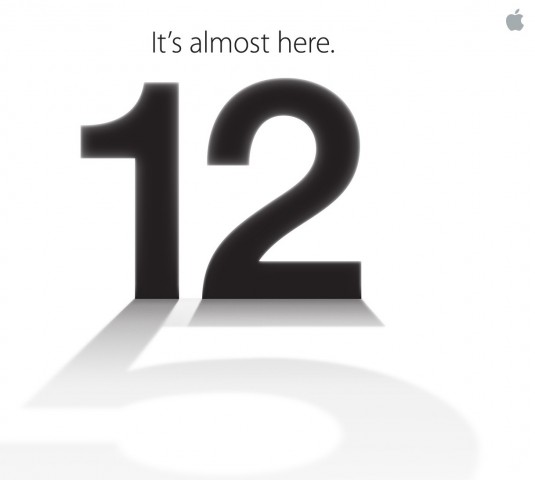
Number 12 casting a shadow of the number 5

Apple announced today that it will be holding a special event on September 12. Apple is rumored to announce a new iPhone, iOS 6 release data and possibly more. iOS 6 will include many accessibility enhancements including Guided Access. The new iPhone may include a better camera, faster processor and larger screen.

Come back on September 12 to hear all the new from Apple and how it effects the world of assistive technology.


Tuesday, July 24, 2012

First ASL Narrated iBook Hits The iPad


A new iBook called Pointy Three includes built in American Sign Language (ASL) video narrations. Click here to download the iBook. Pointy Three costs $4.99 but you can download a sample for free. It is the first iBook to include ASL video narrations. An iPad is required to read the ebook. These video narrations are great for people learning ASL or parents of deaf children. Hopefully, the selection of ebooks with ASL narration will increase.

Watch the above video to learn more. Click read more below to view screenshots of Pointy Three.


Friday, July 13, 2012

EnableTalk Coverts Signs Language Into Spoken Words


For the millions of deaf people communicating is a large challenge. EnableTalk is attempting to solve this problem with a pair of computerized gloves that recognizes sign language and uses text-to-speech to convert the signs to spoken language. Watch the above video to learn more. The prototype gloves link with a smart phone and use a variety of sensors to recognized the signs. An app on the users smart phone then speaks the signs using text-to-speech so people who do not know sign language can communicate with the deaf user. The gloves could end the need for a sign language user to pass notes to non-sign language user, but the non-sign language user would still need to pass notes back to the hearing impaired person. The EnableTalk seem promising and will hopefully be available to consumers in the near future. Click read more below to view a picture of the prototype gloves.


Tuesday, May 15, 2012

What Accessibility Features will iOS 6 Include?


Apple's WWDC developer conference is a month away. Last year at WWDC Apple announced iOS 5 and  if rumors are correct Apple is planing to announced iOS 6 in about a month. iOS is the software that runs the iPod Touch, iPhone and iPad. iOS 5 brought many accessibility improvements including, Speak Selection, AssistiveTouch, custom vibration and VoiceOver improvements. In the above I discuss accessibility features that I would like to see included in iOS 6. Hopefully iOS 6 continues the trend of accessibility improvements that benefit people with disabilities.
What accessibility features are you hoping to see in iOS 6? Let us know in the comments.


Wednesday, May 9, 2012

Text to 911 Will Benefit the Deaf


This weekend Verizon announced its plans to make a nationwide system allowing cell phone users to text message 911. The system will be in place as early as 2013. This service will be helpful for the deaf or hard of hearing who find voice calls difficult if not impossible. Verizon says the following about text to 911's benefit for the deaf or hard of hearing,
"While consumers should always first try to contact a 911 center by making a voice call, this enhanced SMS service, when deployed, will offer an alternative for customers on the Verizon Wireless network who are deaf or hard of hearing and cannot make voice calls or who could be placed in additional danger by speaking."
To be clear if you are able to make voice calls to 911 it remains the preferred method. Text to 911 service has not been deployed so texts to 911 will not be answered. Click read more below to read the Verizon's press release.

The following is copied from Verizon's press release.
Verizon Selects TeleCommunication Systems to Provide Text to 911 National Gateway Solution
New Service Will Enable Customers to Send 911 Short-Code Messages to Emergency Response Centers
BASKING RIDGE, N.J., May 3, 2012 /PRNewswire/ -- Demonstrating its continued commitment to advancing public safety, Verizon Wireless is taking steps toward offering many of its customers a new way to communicate with 911 call centers run by public safety officials. The company announced today that it has selected TeleCommunication Systems Inc., of Annapolis, Md., to participate in an initiative that will enable customers to send 911 SMS (Short Message Service) texts to the call centers, which are known as public-service answering points, or PSAPs.
While consumers should always first try to contact a 911 center by making a voice call, this enhanced SMS service, when deployed, will offer an alternative for customers on the Verizon Wireless network who are deaf or hard of hearing and cannot make voice calls or who could be placed in additional danger by speaking.
"Verizon is at the forefront of 911 public-safety innovations, and today's announcement is another step in making SMS-to-911 service available to those who cannot make a voice call to 911," said Marjorie Hsu, Verizon Wireless vice president of technology. "Our company is continuing its long-standing commitment to address the needs of public safety and our customers by offering another way to get help in an emergency by using wireless technology."
The company is working on plans to make the new capabilities available to select PSAPs by early 2013. Verizon plans to use its existing CDMA SMS network for 911 text notifications. The new service will be offered to Verizon Wireless customers who have a text-capable phone and a service plan that includes text messaging.
"TeleCommunication Systems has worked closely with the FCC over the past two years to develop its innovative technology for SMS to 911," said Maurice B. Tose, president and CEO of TCS. "As the preeminent U.S. supplier of SMS and pioneer in wireless E911, TCS is well positioned to enable Verizon in advancing its public safety commitment."
Verizon is working with others in the communications industry, PSAPs, the Federal Communications Commission and other federal and state agencies in the eventual deployment of this new service aimed at giving consumers new ways to communicate with designated public safety agencies.


Friday, May 4, 2012

Apple to Introduce New Software with Accessibility Features Built-In

WWDC 2012 June 11-15 in San Francisco. It's the week we've all be waiting for.

Apple recently announced that they will hold their World Wide Developer Conference (WWDC). At the conference apple is expected to announce iOS 6 the operating system for iPhone, iPad and iPod Touch. Last year at WWDC Apple announced  iOS 5 which included features such as AssistiveTouch, reader, speak selection, custom vibrations, reminders, Siri and more. If Apple continues its habit of making its mobile devices accessible to a wide variety of users, iOS 6 should have a lot in store.

What accessibility features are you hoping for in iOS 6? Let us know in the comments.

WWDC 2012 Badge with iCal icon on the date Monday June 11th


Saturday, March 17, 2012

The New iPad: Thoughts From an Assistive Technology Prospective


The New iPad is out with a new high-resolution display, improved rear facing camera, dictation and more, but what does it mean for people with disabilities?

Camera - The New iPad has a much improved 5 megapixel rear facing camera. The new camera will enable assistive technology users to capture documents with more clarity. With the new improved camera, apps such as Prizmo, JotNot, ZoomReader, Scanner Pro and TurboScan will work much better.

Dictation - The New iPad also includes voice dictation which allows you to to talk instead of needing to type. The dictation feature works well and is very similar to voice dictation on the iPhone 4S. The new iPad does not have Siri support so it cannot answer your questions.

The New iPad adds some nice new features and remains accessible with VoiceOver. The iPad 2 remains on sale for $399.

Monday, January 30, 2012

SoundJaw Makes Your iPad 2 Louder


SoundJaw is a small plastic clip that amplifies the iPad's speakers. SoundJaw is only compatible with iPad 2. The SoundJaw works by directing the sound from the back of the iPad to the front where you can hear it. The SoundJaw costs $12.99 at SoundJaw.com. If you have trouble hearing your iPad and wish you could make it a little bit louder SoundJaw is perfect for you.

Monday, October 31, 2011

SoundAmp Giveaway


Below is a promo code for SoundAmp. To learn more about SoundAmp click here. To win the app enter the code into iTunes. The first person to enter the code will win the SoundAmp app. Once one person enters the code it will no longer work. If you do not win check back latter for another code. Good Luck.

J433MHW4MHXA

Friday, October 28, 2011

SoundAmp Giveaway


Below is a promo code for SoundAmp. To learn more about SoundAmp click here. To win the app enter the code into iTunes. The first person to enter the code will win the SoundAmp app. Once one person enters the code it will no longer work. If you do not win check back latter for another code. Good Luck.

F7JRWHKA39XM


Monday, October 24, 2011

SoundAmp Giveaway


SoundAmp is a hearing aid App for iOS devices. To learn more about SoundAmp click here. Check back here later for the chance to win promo codes for SoundAmp. If you do not win the code check back later for more codes.

Tuesday, October 18, 2011

Wolfram Alpha is a Knowledge Engine


Wolfram Alpha is an internet based Knowledge Engine. It does more than a search engine because it can do complex math and science equation, generate bar codes, graph equations, display nutritional information and much more. You can try Wolfram Alpha free by clicking here. Wolfram Alpha gives you direct answers instead of links like Bing and Google. Wolfram Alpha can even answer trivia questions like the distance to mars or the width of a football field. The results of the search are displayed in a clear and organized manner that is easy to read.

Wolfram Alpha also has dozens mobile apps for iOS and Android. To learn more about the apps click here. The Wolfram Alpha app is a mobile portal into the Wolfram Alpha knowledge base. Other apps made by Wolfram Alpha include course assistance apps to help you pass your classes and specialized reference apps.

Siri, the iPhone 4S assistant feature also uses Wolfram Alpha to answer your question. To learn more about Siri click here.

Click read more below watch a video about Wolfram Alpha.

Wednesday, October 12, 2011

iOS 5 Released with Many New Accessibility Features

Today, Apple released iOS 5 to the public. The update is available free though iTunes. iOS 5 includes over 200 new features along with numerous accessibility improvements. To learn more about iOS 5 accessibility click here. To read more about iPhone 4S accessibility click here. iOS 5 is compatible with iPhone 4S, iPhone 4, iPhone 3GS, iPad, iPad 2, iPod Touch 4th generation and iPod Touch 3rd generation. Some lesser known accessiblity features include a system-wide dictionary, the option to speak a selected body of text, a reader mode which filters out all distractions on the web and only leaves important content. The new update includes features to help people with visual impairments, hearing impairments, physical disabilities and learning disabilities. Below is Apple's take on iOS 5 accessiblity.
"iOS 5 comes with innovative new features that make it easier for people with mobility, hearing, vision, and cognitive disabilities to get the most from their iOS devices. iOS 5 works with specialized hardware accessories. The LED flash and custom vibration settings let you see and feel when someone’s calling. And improvements to VoiceOver include custom element labeling. These are just a few of the ways iOS 5 continues making advances in the field of accessibility."
Click read more below to see more pictures and videos of iOS 5.