Showing posts with label autism. Show all posts

Friday, September 19, 2014

New in iOS 8: Improved Guided Access with Timers and Touch ID Integration


Guided Access is one of the many iOS features being enhanced in iOS 8. Guided Access is used to keep a someone on a single app using  a password. For example, if you want your child to read a book and not watch a video you can lock them into the reading app, eliminating the ability to navigate to other apps. With Guided Access enabled, a child or student will need a passcode in order to enter another app. To learn more about Guided Access click here.

One of the enhancement allows users to end a Guided Access session with their finger print using Touch ID. Similar to how third-party developers can implement Touch ID authentication, Guided Access will also take advantage of finger print reading technology. Instead of entering a passcode, users with a Touch ID enabled device will be able to end the session simply by placing their finger on the Touch ID sensor. This feature will simplify the processes of ending Guided Access and potentially eliminate the frustration resulting in forgotten passcodes.

The other enhancement allows students and parents to set a time limit. After the time expires the app will not respond until the correct passcode or finger print is entered. Periodically a small message appears showing how much time is remaining. This feature could be perfect for test taking by ensuring students stop answering questions after the allotted time expires, or for setting a time limit for playing games- when the time limit is reached, the app will not respond.

To enable Guided Access navigate to Settings > General > Accessibility > Guided Access.


Monday, April 22, 2013

Proloquo2Go 3.0 Coming Soon With Exciting New Features


Proloquo2Go 3.0 is coming soon according the maker AssistiveWare. If you are unfamiliar with Proloquo2Go click here for background information. Proloquo2Go is the most well known alternative and augmentative comunication (AAC) apps for iOS devices. AssistiveWare does not seem be resting on its laurels and has some exciting new features planned for upcoming version 3.0. One of the new features is something AssistiveWare calls ExpressivePower. This new features will allow users to create buttons with certain intonation and emotion. This is great news for people who uses Proloquo2Go for everyday communication. Users will also be able to switch between voices more quickly in version 3.0. Version 3.0 will also include greatly improve switch access and more options to manage switches. Proloquo2Go 3.0 will be a free update for all current users in the next month or so. Proloquo2Go is avalible in the App Store for $189.99.

Click read more below to view videos about Proloquo2Go.


Tuesday, September 25, 2012

What is Guided Access?


Apple's new iPhone 5 and iOS 6 are out and include many new accessibility features. One of the biggest accessibility features of iOS 6 is called Guided Access. iOS 6 is the operating system that runs on the iPhone, iPad and iPod Touch. To enable Guided Access go to Setting > General > Accessibility > Guided Access. Guided Access allows an parent or teacher to restrict access to a single app. This restricts kids from switch apps to watch videos or play games. Guided Access also allows parents and teachers to block off individual buttons within an app. For example if an app have setting a teacher could block it off so the students could not change app settings. Guided Access is great for teachers, users with autism or users with ADD. Guided Access allows teachers to administer tests on the iPad without worrying about students looking up the answers on the internet.

Watch the above video to learn how to use Guided Access. Click read more below to view more videos of Guided Access.


Tuesday, September 4, 2012

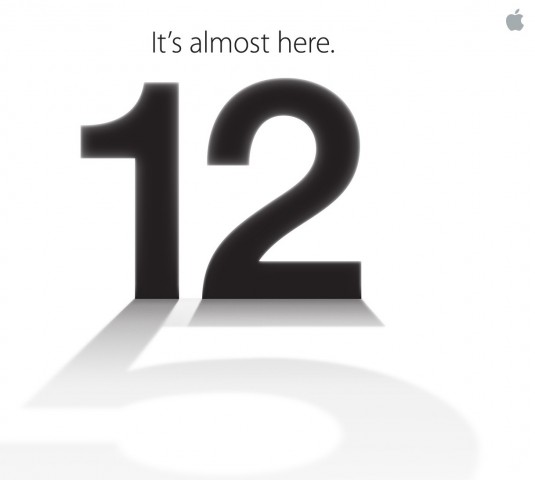
Apple To Hold Special Event on September 12

Number 12 casting a shadow of the number 5

Apple announced today that it will be holding a special event on September 12. Apple is rumored to announce a new iPhone, iOS 6 release data and possibly more. iOS 6 will include many accessibility enhancements including Guided Access. The new iPhone may include a better camera, faster processor and larger screen.

Come back on September 12 to hear all the new from Apple and how it effects the world of assistive technology.


Saturday, June 30, 2012

Proloquo2Go 2.0 Released With Many New Features


Earlier this week Proloquo2Go 2.0 was released. To view the video on its original site click here. Proloquo2Go is one of the best augmentative alternative communication (AAC) apps for the iPad, iPhone and iPod Touch. Some of the new features include the ability have multiple users, new text-to-speech voice and new page layout options To review a full review of Proloquo2Go click here. To download Proloquo2Go click here.

Click read more below to view screenshots of Proloquo2Go.


Monday, June 11, 2012

Apple Announces iOS 6 With New Accessibility Features


Today, Apple announced iOS 6 a new update for its mobile devices. Among other new features is enhancements to Siri and new accessibility features. Click here to learn more about Siri.  With iOS 6, Siri will be able to answer even more of your questions. Siri is also making its way to The New iPad. Another new feature is called Guided Access. Guided Access is designed to help students with Autism and related disabilities stay on task. It works by allowing a teacher or parent to control what control a kid can have. For example, you can turn off access to the home button to ensure that the child stays on task. Apple says the following about Guided Access,
"iOS 6 comes with even more features to make it easier for people with vision, hearing, learning, and mobility disabilities to get the most from their iOS devices. Guided Access helps students with disabilities such as autism remain on task and focused on content. It allows a parent, teacher, or administrator to limit an iOS device to one app by disabling the Home button, as well as restrict touch input on certain areas of the screen. VoiceOver, the revolutionary screen reader for blind and low-vision users, is now integrated with Maps, AssistiveTouch, and Zoom. And Apple is working with top manufacturers to introduce Made for iPhone hearing aids that will deliver a power-efficient, high-quality digital audio experience."
Another great change is word by word highlighting for Speak Selection. iOS 6 will allow the iPhone to work better with hearing aids. Also included are enhancements to VoiceOver including VoiceOver compatibility with zoom, assistive touch, and maps. iOS 6 will be available this fall as a free update.


Click read more below to learn more about iOS 6 accessibility.


Saturday, February 4, 2012

Kraken II Dockable Case for iPhone 4 and iPhone 4S


Many people, including children, use the iPhone as an assistive technology device. The Kraken II Dockable case is an ideal case to protect your iPhone. The Kraken II Dockable Case is great for both children and adults who need superior protection for their iPhone. The case will protect against most bumps and drops so there is less need to worry when using the iPhone.


The Kraken II Dockable Case is a rugged and protective case for the iPhone 4 and iPhone 4S. It features three layers of protection and a few cool features. The first layer of protection is a silicon inner shell. The inner shell is attached to the second layer of protection which is a plastic outer shell. The third layer of protection is a build in screen protector which protects the screen against damage. The outer plastic is a soft touch material that feels nice in the hand and does not show finger prints. All of the ports and buttons are covered with rubber but are still usable. The headphone port, mute switch, and dock connector are covered by rubber flaps to keep out dust. The lock and volume buttons are easy to feel and provide good tactile feed back. The home button is flush with the front of the case and can be hard to locate by feel. The phone speaker is covered by a dust shield that works well. Much like the Kraken AMS, case the Kraken II Dockable Case has a kickstand on the back which is perfect for video chat and much more. On the bottom of the case is a thick silicon flap that can be easily removed to dock the case. It is not common for a rugged case to be able to be dockable. However, with the flap off it is difficult to push the home button because it is very recessed.


At the time of the posting, the case costs about $30 from Amazon.com. Trident says the following about their docking feature of the case:
"The bottom of the case features a removable silicone sleeve which allows the case to be placed in a docking station without the hassle of removing the case."
The case does add bulk to the phone, and makes it heavier and less sleek, but if you are looking for protection, and the ability to dock your iPhone this case is for you.


Click read more below to see more videos and pictures of the Kraken II Dockable Case.


Case was provided complimentary to the reviewer.


Saturday, January 28, 2012

Trident Kraken AMS for iPhone 4 and iPhone 4S


Many people including children  use the iPhone as an assistive technology device.  The Kraken AMS cases is an ideal case to protect your iPhone. The Kraken AMS is great for both children and adults who need superior protection for their iPhone. The case will protect against most bumps and drops so there is less need to worry when using the iPhone.

The Trident Kraken AMS has three layers of protection: a silicon inner sleeve, hard plastic outer shell and a built in front screen protector. The inner layer is a thick silicon that can be used as a stand alone case in less rugged situations. The inner silicon has thick corners  for added protection. The outer layer is a hard plastic that snaps into place around the silicon. The built in screen protector does not effect the screens performance. 

 It has a nice mat finish that feels great in the hand and does not show finger prints. The back is slightly tapered to fit better in the hand. All buttons and ports are covered to block dust. The headphone port and 30-pin connector are under silicon tabs that can be removed to access the ports. The headphone port is smaller than most cases and may require the use of an included adapter to work with larger headphones.

 The home button and sleep/wake button are also covered but they are still easy to find and press. The ringer lock switch is very recessed and may be difficult to access for some users with larger fingers and shorter finger nails. The volume buttons are easy to press and provide great tactile feedback. The back of the case has a cut out for the camera and flash and the Apple logo. To protect the Apple logo from scratching, the case comes with a rear protective film. 

Also on the back is a removable kickstand which makes hands free FaceTime or Skype calls simple. It also allows you to read or watch videos at an angle, hands-free. The kickstand can be removed and replaced with other connections such as tripod connections and more. The case includes a belt clip that clips onto the front of the iPhone. The Kraken AMS comes in many different color combinations including green, blue, black, pink and red. The Kraken AMS is a tough case that will help to protect your iPhone from everyday life. The Kraken AMS costs $49.95 and is available from the Trident Store. Click here to learn more about cases made by Trident cases.

All of this protection adds bulk to the phone, and makes it heavier and less sleek, but if you are looking for protection, this is a great choice.

Trident says the following about their Kraken AMS cases,
"Kraken cases are for users with intense lifestyles who need a case that can take serious abuse. Police officers, firemen, campers, military personnel and construction workers are examples of users who have given the best reviews of Kraken cases. These are also perfect for young kids."
Click read more below to see more videos and pictures of the Kraken AMS for iPhone 4 and iPhone 4S.


Case provided complimentary to the reviewer


Monday, January 2, 2012

Proloquo2Go the Premiere AAC App for iOS


Proloquo2Go is the most full featured augmentative and alternative communication (AAC) app for iOS. The app can help people who have trouble communicating communicate by touching words or phrases that they want to have spoken aloud. To learn more about Proloquo2Go visit their website at Proloquo2Go.com. Proloquo2Go has an extremely visual interface that makes finding what you are looking for easy. The home screen of Proloquo2Go has a grid with folders; each folder has an image and title on it. The user touches a folder to enter that category. For example if you wanted to say "yes" you would click on the yes, no, maybe folder and the touch the yes button. Once you touch the yes button a computerized voice would say "yes." Many folders have numerous sub folders which can make it time consuming to find the word or phrase you would like to say. Luckily, you can make quick sets of words and phrases you use often for quicker access. In addition you can make custom commands such as family member's names or home address. Proloquo2Go also allows users to input the word  they want via a keyboard. The keyboard has advanced word prediction that allows users to insert words faster. When using the keyboard you can type out phrases that Proloquo2Go will say allowed when you are finished typing. Proloqu2Go allow features several high quality text-to-speech voices. Proloquo2Go is a feature filled AAC app that can allow people to communicate. Because of the abundance of features Proloquo2Go can be slightly complex to use at the beginning. To try Proloquo2Go you can stop by your local Apple Store and find the app installed on all of the display iPads. Proloquo2Go is $189.99 in the App Store and works with iPhone, iPad and iPod Touch. Proloquo2Go can replace much more expensive AAC devices and using Apple devices can make users feel less self-conscious than using a dedicated AAC device that is different from anything peers or same age students would use. To watch Proloquo2Go featured on 60 minutes click here. To learn more about Proloquo2Go click read more below.

Key features
  • Full communication solution with a default VocaSpace vocabulary of over 7000 items
  • Choice of list or grid view
  • Built-in natural sounding text-to-speech voices from Acapela Group (one language, initially only British and American English). The current version includes North American English male, female, girl and boy voices. These can be swapped for British English voices, which can be downloaded over Wifi from within Proloquo2Go. Support for other languages and voices is in the pipeline.
  • Supports picture and/or text-based communication
  • Close to 8000 built-in symbols from SymbolStix LLC.
  • Automatic conjugation of verbs
  • Automatic plurals and possessives for nouns
  • Extensive customization options: item size, color, interactivity, restrictions, speech.
  • One-button addition of new vocabulary items and categories
  • Easy cut, copy and paste of items
  • Quick access to recently spoken items for the last 15 minutes, last hour, all the way up to one week back
  • Typing view with advanced, self-learning multi-word prediction for typing full paragraphs

This App was provided complementary to the review by AssistiveWare  


Sunday, October 23, 2011

Apps for Autism (60 Minutes)


60 Minutes featured communication Apps for iPad this week. Above is the full episode. Click here to read the full story. 60 Minutes describes the episode as follows,
"Autistic people whose condition prevents them from speaking are making breakthroughs with the help of tablet computers and special applications that allow them to communicate, some for the first time. Lesley Stahl reports."