Friday, June 20, 2014

Happy Birthday VoiceOver


Five years ago, Apple did what seemed impossible; making the smooth glass of the iPhone touch screen accessible to the blind. A seemingly impossible task made possible by one of Apple's greatest software innovations; at least in my mind and the minds of millions of others with disabilities. Apple's solution was VoiceOver, a screen reader like no other before. VoiceOveruses touch gestures instead of keyboard shortcuts and other more desktop friendly inputs that had been used before. Simply put, VoiceOver allowed millions of blind and visually impaired users to experience the magic that was iPhone. In some ways, VoiceOver is to accessibility as the Model T was to transportation: both brought new opportunities to the masses.

VoiceOver has come preinstalled on every iPhone, iPad, and iPod touch for the past five years. Blind and visually impaired users can purchase a device off the shelf and have access almost immediately. Apple often says “built-in, not bolted on” when talking about accessibility which is definitely accurate in respect to VoiceOver. Thanks to VoiceOver blind and visually impaired users were as much a part of the smartphone revolution as any other user group. Over the past five years Apple has refined and updated VoiceOver and has added new accessibility features to help users with a wide variety of disabilities. Apple devices pushed the entire smartphone and tablet market to become more accessibile to more people.

The inclusion of VoiceOver and other built-in accessibility features has allowed the App Store to boom with assistive apps to help the needs of people with disabilities. Not only did VoiceOver show that accessibility was possible on a touch screen phone, it gave developers a foundation to build great accessible apps. Basically, VoiceOver created a customer base for apps that helped the blind, which drove demand and increased the supply of great accessible apps. Another app gold-rush of sorts, but this time with apps tailored to people with disabilities. These apps are opening up new possibilities for disabled iOS users.

On this fifth birthday of VoiceOver, Apple continues improve its accessibility offerings. Apple Keynote events routinely focus on a person with a disability being aided by an Apple product; it is clear that Apple cares about accessibility. New accessibility features come with every release of iOS, allowing users with different needs to get the most out of their device. However, no software is bug free and users are encouraged to email accessibility@apple.com with suggestions or comments. And a many developers still do not support accessibility features in their apps. It can go a long way for users to tweet or email a developer asking for enhanced accessibility features. With Apple releasing “new product categories” within the year as CEO Tim Cook is often heard saying, hopefully accessibility remains at the forefront. VoiceOver has opened doors for millions of blind and low vision users, what other five-year-old can say that?

Happy birthday VoiceOver!


Amazon Announces Fire Phone with Advanced Image Recognition and Built-in Accessibility

Courtesy: Amazon.com

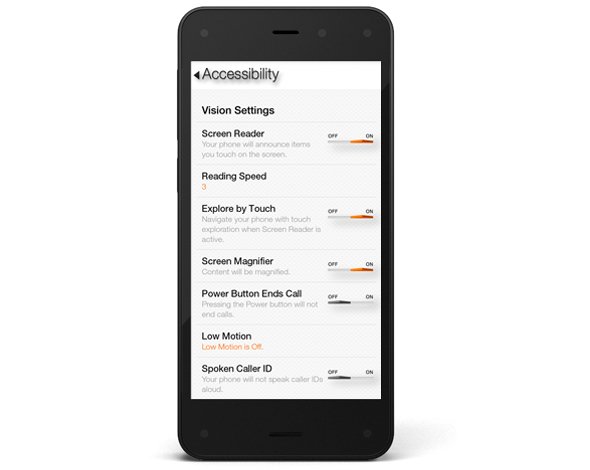
This week, Amazon announced there first smartphone called Fire Phone. The Fire Phone has a number of flashy, maybe even gimmicky, features along with a few features that may have serious accessibility implications. The phone which starts at $200 and starts shipping on July 25th runs Fire OS 3.5.0 similar to Amazon's Kindle Fire tablets. The operating system includes a number of built-in accessibility features including features to help blind, low vision, mobility impaired, and hearing impaired users. For blind and low vision users, the Fire Phone includes a screen reader which allows users to navigate the screen without seeing it. Assuming the Fire Phone uses the same text-to-speech voices as the Kindle Fire tablets, the text-to-speech voice used is very high quality. For low vision users, the Fire Phone includes a zoom mode and high contrast support. Closed captioning, mono audio, and hearing aid compatibility (HAC) are features included for users with hearing impairments.The Fire Phone also includes features for users with mobility challenges including dictation and improved one-handed usability. It is very encouraging to see Amazon include accessibility features in to their Fire Phone. Click here to read a full overview of all the Fire Phone's accessibility features. Amazon, once reluctant to support accessibility, has shown a new dedication to accessibility for users with disabilities. Hopefully, this continues in future updates to the Fire OS as well as to future products.

In addition to dedicated accessibility features, the Fire Phone has a couple of mainstream features that could be potentially beneficial to people with disabilities. The first of these features is called Mayday. Mayday is currently available on newer Kindle Fire tablets allows users to quickly connect and chat with technical support directly from their device. Simply by pressing the easy to access Mayday button users are atomically connected. Technical support staff can access certain device functions to assist users with a variety of questions. Support staff can even virtually draw on the screen to draw your attention to certain buttons. In my testing, I was able to connect with Mayday staff in under a minute and the staff was knowledgeable and friendly. The support personnel were even knowledgeable about accessibility features. This feature could be great for users with cognitive challenges who need assistance using certain features on their phone.

The second feature is called Firefly. By pressing a dedicated button on the side of the device and pointing the camera at an object the Fire Phone can identify that object. Amazon demonstrated this feature at their even and it worked very quickly. Firefly could be used by the blind to identify objects and differentiate objects of similar size and shape. For example, to identify if a can contains chicken soup or sliced peaches. Similar to iOS apps like TapTapSee, Firefly is Amazon's attempt to make buying merchandise through Amazon an easier process.

The Fire Phone seems promising, but it is impossible to determine its true value in terms of accessibility until it is released next month. Until then, click read more to view videos of the Fire Phone in action.


Thursday, June 19, 2014

Kindle App for iOS and Android Adds Whispersync for Voice


Amazon's Kindle app for iOS and Android was recently updated to integrate audio books from Audible. The update, which is available for free, allows users to seamlessly switch between reading the Kindle text version of a book to listening to the Audible audio version of a book. For example, if you read part of the book and then switch to the audio version the recording will pickup right where you left off. The new feature even allows users to listen to the audio book while following along with the text version. Audio speaking rate can be increased or decreased according to user preference. Unfortunately, unlike Immersion Reading on Kindle Fire tablets, the Kindle app for iOS and Android does not highlight the text as it is being read allowed. While this may not be an inconveniences for some users, it could be a major omission for users with tracking difficulty. For now, users will need a Kindle Fire tablet to take advantage of the full Immersion Reading experience. To learn more about Immersion Reading click here. There is one another major caveat: price. In order to take advantage of Whispersync for Voice or Immersion Reading on a Kindle Fire, you must purchases both the Kindle and Audible versions of a book. This can become extremely expensive for the occasional reader let alone a book worm.

To download the app for iOS click here and to download the app for Android click here. To view screenshots of the app in action click read more below.